Applying Non-Call Parameters
A Non-Call activity is time set aside to follow up on Email, Chat Session, Outbound calls, or other activity that does not involve answering calls.
What do you want to do?
Tasks in this Topic Include:
- Access Non-Call Activities
- Applying Non-Call Parameters
- Create a New Non-Call Activity Code
- Remove a Non-Call Activities Code
Related Tasks:
- Create Sites
- Setting Up Hours of Operation
- Create Skills
- Applying Service Levels
- Creating Skill Teams
- Applying Shrinkage Parameters
- Setting Up Exception Codes
- Import Work History
- Applying Non-Call Parameters
Access Non-Call Activities
- Select Setup from the left-navigation menu.
- Select Workgroups.
- Select the workgroup you want to work with from the Workgroup drop-down menu.
- Select Non-call Activities.
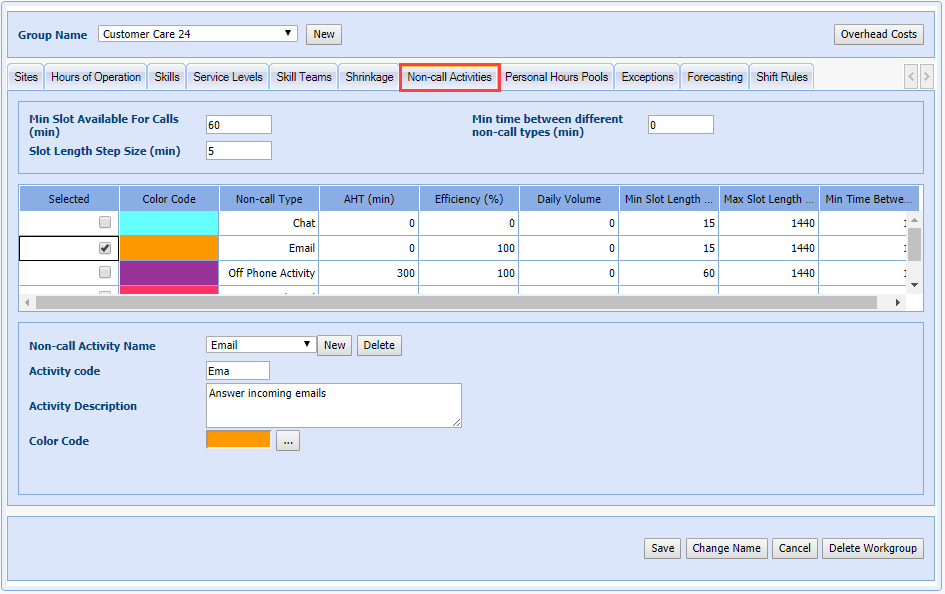
Non-Call Activities Tab
|
Non-Call Activities Tab Fields |
Description |
|---|---|
| Selected | Checking this box activates the non-call activity for the active workgroup. |
| Color Code | Checking this box activates the non-call activity for the active workgroup. |
| Non-call Type | The non-call activity’s name. |
| AHT (min) | Average time (in minutes) it takes to handle an individual task of this type. |
| Efficiency (%) | Amount of time spent working on the task that applies to the AHT. (Example: A task takes 15 minutes to complete with 5 additional minutes of preparation, total time 20 minutes. Efficiency % is 75.) |
| Daily Volume | Number of tasks to complete per day across the contact center. |
| Min Slot Length (min) | The shortest allowable non-call activity slot size (in minutes). |
| Max Slot Length (min) | The longest allowable non-call activity slot size (in minutes). |
| Min Time Between (min) | Minimum amount of time between blocks of this non-call activity (in minutes). Setting this will ensure that multiple sessions can be spaced apart. |
Create a New Non-Call Activity Code
- Select the Non-call Activities tab.
- Select New.
- Enter a code in the Non-Call Activity Code field.
- Enter a brief description about the activity in the Activity Description field.
NOTE: The description
is visible to the agents via the agent portal.
- Select a Color Code to represent this non-call activity code.
- Select Save.
Remove a Non-Call Activities Code
- Select the code you want to delete from the Non-Call Activity Name drop-down menu.
- Select Delete.
NOTE: Deleting
non-call activity codes will remove related information from all the workgroup(s)
that perform this non-call activity.