Applying Shrinkage Parameters
The Shrinkage Maintenance feature allows you to include shrinkage parameters (as percentages) for an entire week so that you will not have to add the shrinkage parameters every time you want to generate a forecast. Shrinkage is unanticipated lost hours. WFO Live has categorized all such unplanned breaks into three categories:
- Unscheduled Breaks (in %)
- Non-Scheduled Activities (in %)
- Absent (in %)
Shrinkage is taken into consideration while generating the Forecast.
What do you want to do?
Tasks in this Topic Include:
Related Tasks:
- Create Sites
- Setting Up Hours of Operation
- Create Skills
- Applying Service Levels
- Creating Skill Teams
- Applying Non-Call Parameters
- Setting Up Exception Codes
- Import Work History
Shrinkage Parameters
These are the available fields used to configure Shrinkage in a Work Group.
|
Shrinkage Parameters Fields |
Description |
|---|---|
| Days of Week | Sunday through Saturday. |
| Unscheduled Breaks (%) | |
| Absent (%) | |
| Non Scheduled Activities (%) | |
| Save | Saves the changes. |
| Change Name | |
| Cancel | Cancels the changes. |
| Delete Workgroup |
Applying Shrinkage Parameters
- Select Setup from the left-navigation menu.
- Select Workgroups.
- Select the workgroup you want to work with from the Workgroup drop-down menu.
- Select the Shrinkage tab.
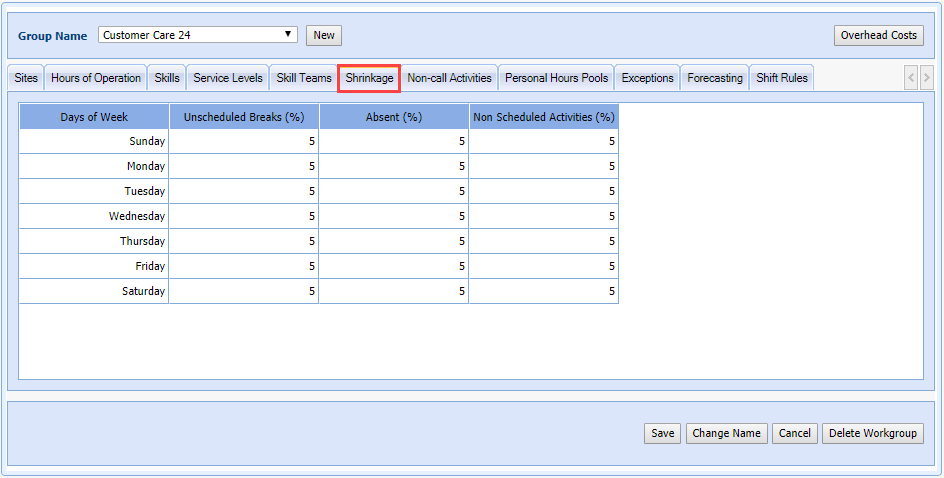
- Enter the shrinkage parameters for the entire week.
- Select Save.