Calculate Cumulative Ratios
A ratio analysis can be made for varying time periods, and is helpful in determining the performance of the contact center. It can also be used for maintaining high efficiency levels. This is an advanced tool for monitoring the current day activities of the contact center.
What do you want to do?
Tasks in this Topic Include:
- Today's Roster
- Assigning an Agent
- Un-Assigning Agents
- Graphical View
- Un-Assign Agents from the Graphical View
Related Tasks:
Monet University:
Calculate Cumulative Ratios
The cumulative ratio for the current day is calculated automatically using the From and To settings in the Workgroup Setup > Forecasting > Set the Current Day Cumulative Ratio Default Settings.
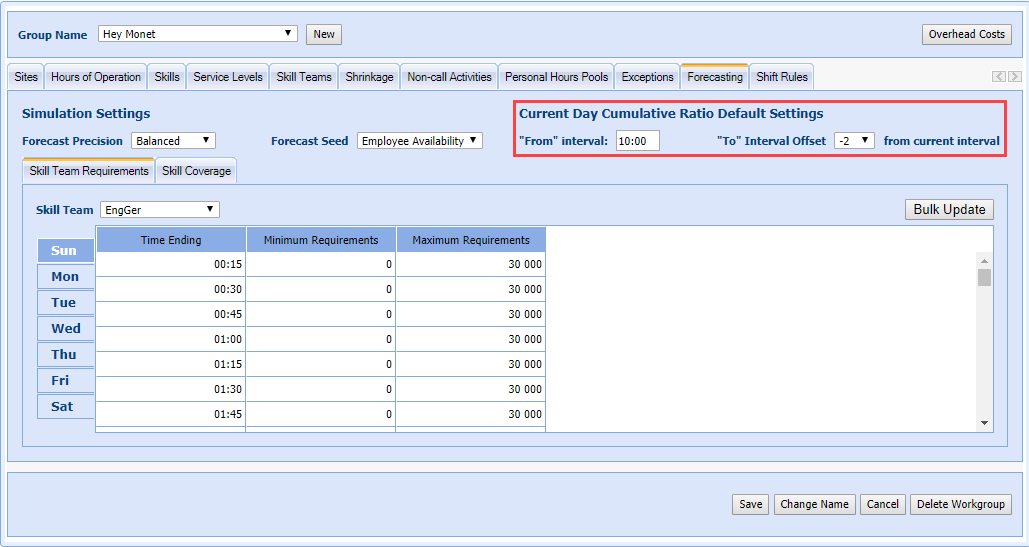
- Any day other than the current day always defaults to the From and To Workgroup hours of operation.
- The From interval is restricted to the Workgroup start time and after (the default cannot be set before the Workgroup opens).
- If the Administrator accesses the screen outside the Workgroup hours on the current date, then the Workgroup hours are used as the default.
- If the "To" interval Offset from Current Interval setting ends up going beyond (before) the From interval setting, then the Offset used is always -1.
For Example:
- The From interval is set to 8:00 AM.
- The Offset is set to -6 (90 minutes prior to the current interval.
- The administrator accesses the Intra-day screen at 9:07 AM.
- There are -6 intervals before the current interval (9:00-9:15).
- This would use interval 7:30 - 7:45, which is before the From interval time; so the default setting is ignored. The Offset used is then -1.
- The Cumulative ratio uses data from 8:00 AM - 9:00 AM.
To Calculate Cumulative Ratios
- Select Manage > Intra-day, and then the Cumulative Ratio tab.
- Enter the Start Time and the End Time for the workgroup to define the time period for which the ratio analysis is performed.
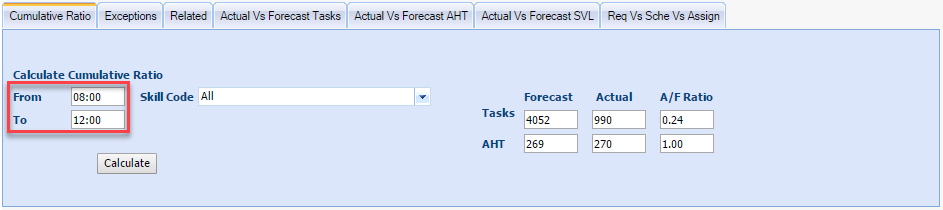
NOTE: You will
automatically default to the current day; and the cumulative ratio will
automatically calculate using the window of time indicated by the “From”
and “To” fields. These settings allow you to set the default values of
these fields. The time periods should be those between the shift times
of the workgroup. If
the user accesses the screen outside the workgroup hours on the current
date, then the workgroup hours are used as the default.
- Select Calculate to display the cumulative to actual forecast ratio, which contains the following information for the selected time period of the current day:
- Number of Forecasted calls
- Number of Actual Calls
- Actual Calls/Forecast Calls Ratio
- Forecasted AHT
- Actual AHT
- Actual AHT/Forecasted AHT Ratio
NOTE: The fields
on this screen include Start Time, End Time, Calls (Actual Calls/Forecast Call Ratio), and AHT (Actual AHT/Forecasted AHT Ratio).
- Adjust the From and To time periods, and the Skill Code as desired.
NOTE: The time
selected should contain both forecast and actual data to compare.
- Select Update Forecast.

NOTE: The table
shows calculated ratios on a per-skill basis and can be manually edited
before updating the forecast.