AUX Scorecard
The Monet Metrics AUX Scorecard feature allows the workforce management team to keep track of a group of KPIs in addition to the ones used for the Metrics Scorecard. The AUX scorecard is divided into multiple sections that report on a specific set of metrics. Each one of these agent scoreable metrics can be assigned a certain weighting and value in the AUX scorecard to provide one standardized performance score for all your agents.
NOTE: Agent based
scores are used, Skills based scores are NOT
included in the Scorecards.
What do you want to do?
Tasks in this Topic Include:
Related Tasks:
- User Access Roles
- Goals and Alerts
- Metrics Scorecard Setup
- Attendance Setup
- Custom Metrics Setup
- Custom Metrics Import
- Initial Attendance Score
- Initial AUX Score
AUX Scorecard Setup
Set up the AUX scorecard to define how each KPI weighs into the Monet Agent Performance Score.
- Select Metrics in the left-navigation window.
- Select AUX
Setup under the Configuration
menu item.
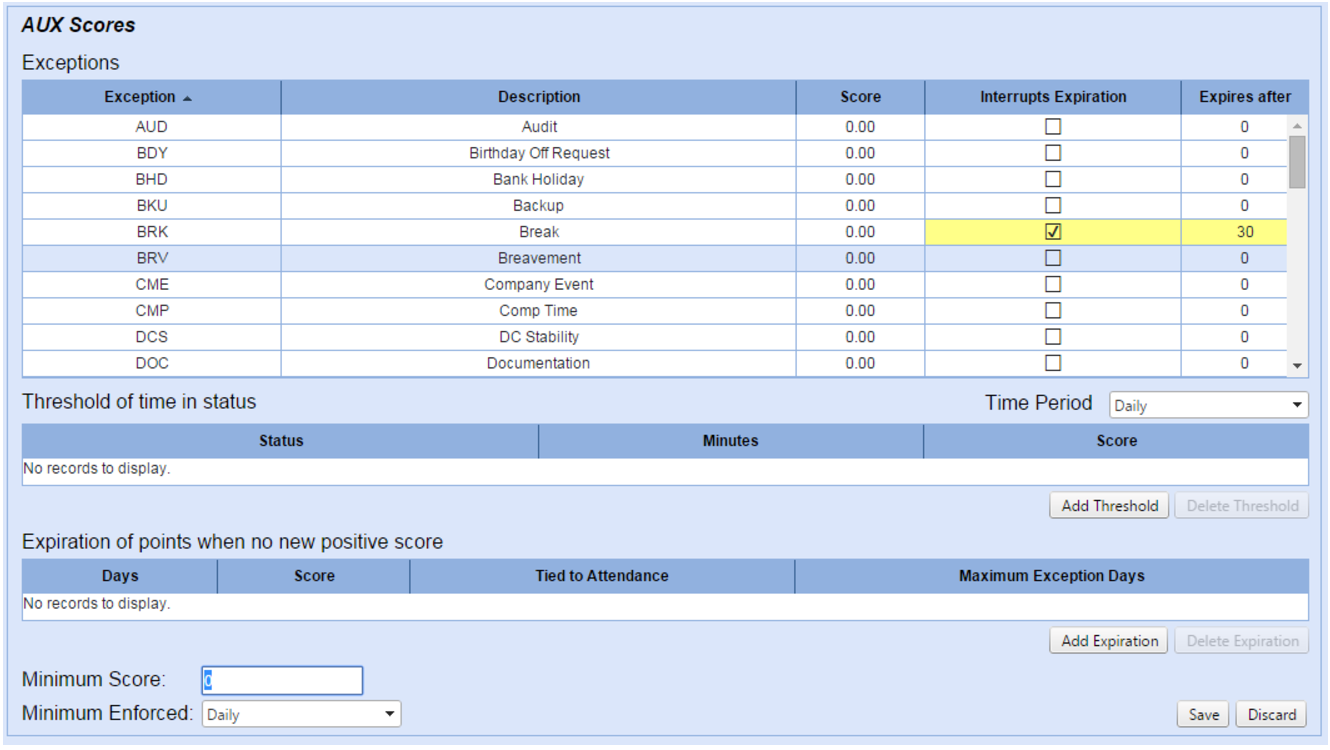
- Select an exception in the Exceptions table.
- Select the Interrupts Expiration check box to cause points given for exceptions to re-set the counter for Expires after date to re-set.
- Enter the number of days until the points given for an exception expire in the Expires after column.