Personal Hours Pools
The Paid Time-Off (PTO) management feature and Personal Hours Pools allows the tracking of time-off requests from agents. For example, a PTO balance accrued in your payroll system can be imported as available hours and usage against the balance available for each agent. Multiple time-off pools are supported, such as Sick and Vacation time.
What do you want to do?
Tasks in this Topic Include:
Related Tasks:
Create a Personal Hours Pool
To create a new pool:
- Select Setup > Workgroups.
- Select the Personal Hours Pool tab.
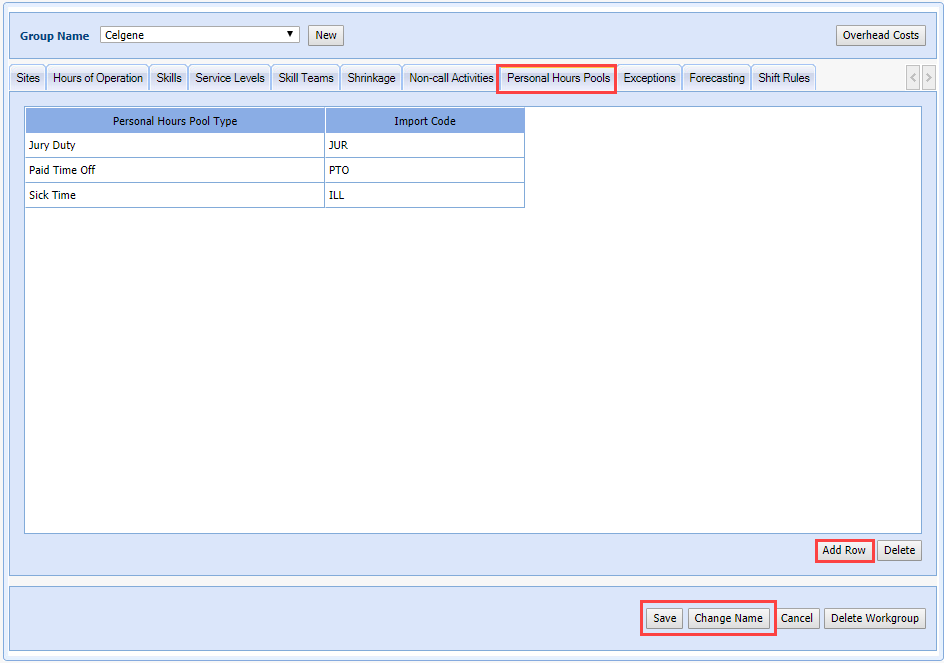
- Select the Add Row button and then enter the name of your new personal hours pool type in the first column.
- Enter the Import Code in the second column.
- Select Save
to save the new pool.
Change a Personal Hours Pool Name
To change the name of a pool:
- Select the Personal Hours Pool Type to change.
- Select Change Name.
- Enter the new name.
- Select Save.
Delete a Personal Hours Pool
To delete a Personal Hours Pool:
- Click in the row to delete.
- Select Delete.
NOTE: There will
be no warning prompt when you click Delete.