Shift Swapping Options
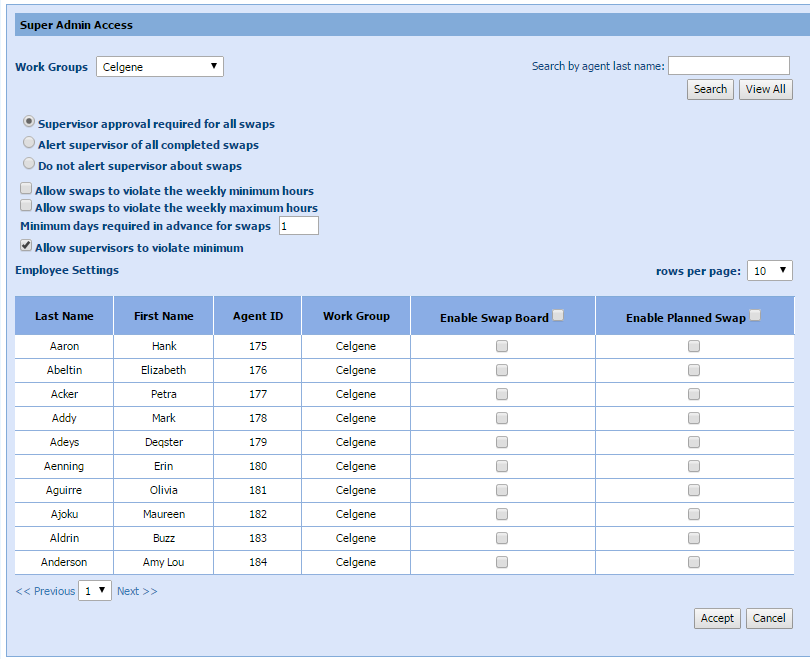
Administrators can set the options for agents being able to swap shifts to allow supervisors to control approvals and alerts, and also control the use of the Swap Board and Planned Swaps.
What do you want to do?
Tasks in this Topic Include:
Related Tasks:
Search for an Agent
To search for an individual agent to apply a shift swap to:
- Select the Work
Group from the drop-down menu.

- Enter the last name of the agent in the search box and select Search. All agents with the same last name are displayed in the Employees Settings table.
Set Shift Swap Options
- Select the appropriate radio button to set the Supervisor Options:
- Alert supervisor of all completed swaps.
- Do not alert supervisor about swaps.
- Supervisor approval required for all swaps.
- Select the appropriate check box to set the weekly hours
options:
- Allow swaps to violate the weekly minimum hours.
- Allow swaps to violate the weekly maximum hours.
- Set the minimum days required in advance for swaps:
- Enter the number of days in the text box.
- Set the Allow supervisor to violate minimum check box to allow or disallow the supervisor to violate the minimum hours.
Employee Settings
You can enable employee privileges to allow them to use the Swap Board and/or Planned Swaps.
- In the Employee
Setting table, select the appropriate check box to enable the Enable Swap Board and Enable Planned Swap functions as desired.
- Select Accept.