My Schedule Changes
Agents can view their schedules remotely from a browser.
What do you want to do?
Tasks in this Topic Include:
Related Tasks:
- My Agent Homepage
- My Schedule
- Schedules for Bidding
- My Bids
- Schedule Swap Requests
- My Alerts
- Change Password
View My Schedule Changes
To view your schedule:
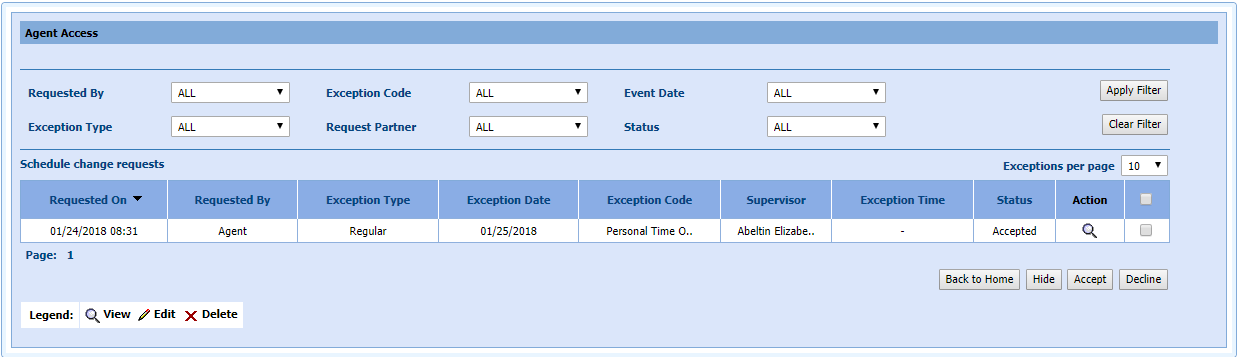
- Select My
Schedule Changes from
the left navigation menu.
-
Filter the results as desired.
- Select Apply Filter.
Schedule Changes Filters
| Schedule Changes Filters | Description |
|---|---|
| Requested By | All, Agent, Supervisor |
| Exception Code | All, Personal Time Off |
| Event Date | All, Past, Future |
| Exception Type | All, Regular |
| Request Partner | Other agent name wishing to swap their schedule |
| Status | All, Accepted |
| Apply Filter | Applies the filters chosen |
| Clear Filter | Clears the filters |
NOTE: The column
headings can be clicked on to sort by ascending/descending values.
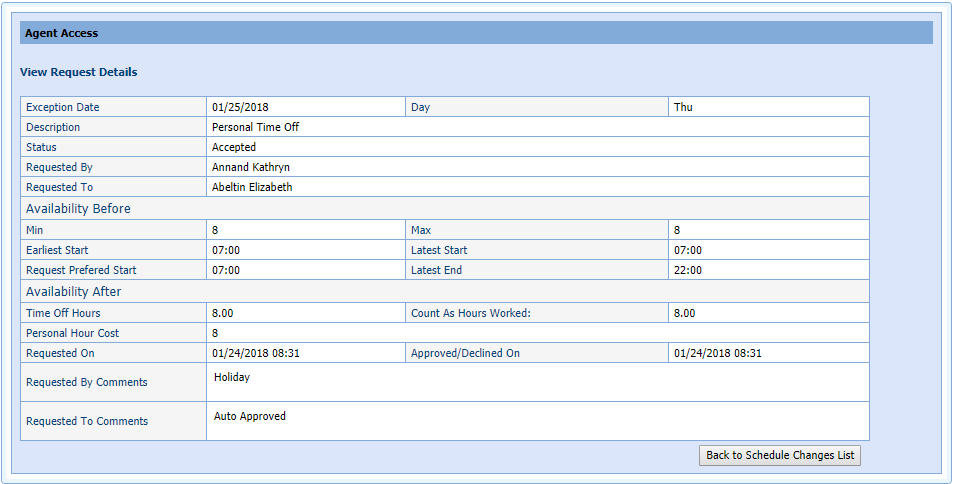
- Select
the magnifying glass icon in the Action column
to view the request details.