Multi-Channel Service Level Configuration
The multi-channel skills feature enhancement to WFO Live allows users to select Skill Types when setting up workgroups. This skill type will include options for setting service levels for activities aside from inbound calls alone. Some options include longer service levels, interruptible tasks, and simultaneous tasks.
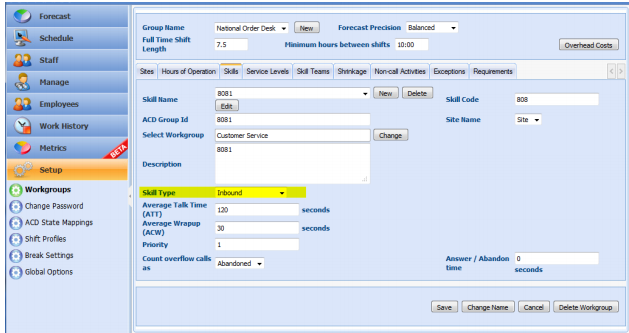
Configuring Skills
Although skills will primarily draw from the work history imported into Monet through Excel (or via automatic data collector), the user can select the average skill time and average wrap-up time for backup and information purposes.
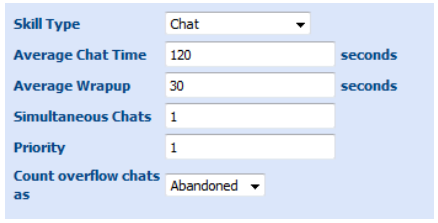
- Chat allows the unique option of "Simultaneous Chats" this
means that the available agent can be simulated as handling this number
of multiple chats.
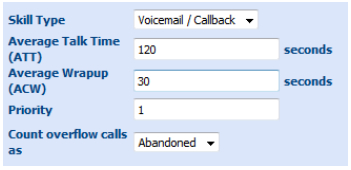
- Voicemail / Callback is handled the same way as inbound calls.
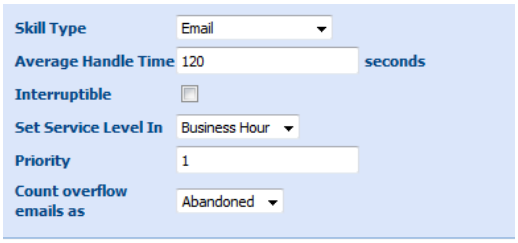
- Email has an option to set the service level as business hour or business
day increments. It also features an option to label these items as 'interruptible,'
which means that inbound calls can interrupt e-mail work when this sort
of task is blended with other skills.
- Task gives the handle time and omits ACW (Wrap-up) for simplicity.
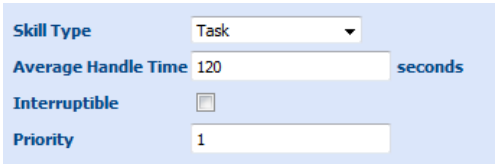
- Outbound is handled similarly to inbound but allows a distinct categorization.
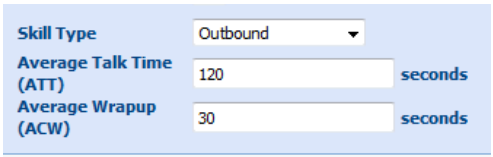
Configuring Service Levels
The Service Levels tab offers three distinct Goal Types for each skill
and parameters to define the service objectives.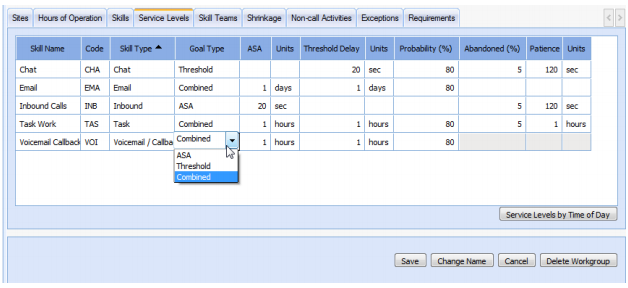
- Threshold: A combination of Threshold Delay and Probability percentage. This setting creates a TSF (Time Service Factor) also known as a Grade of Service in which you define the amount of time for the goal to handle this task, and the percentage this goal must be met at a minimum (80% of calls in 20 seconds for example).
- ASA or Average speed of answer/handle: The average amount of time the work unit is handled.
- Combined: the combined goal of both Threshold and ASA.
If there are any questions on this process, please contact Monet Support at support@monetsoftware.com, or at 310-207-6800, Ext. 2.